
Leaked Snapchat: What I Actually Do When Things Go Wrong

I still remember the exact moment my stomach dropped. A friend texted me a screenshot of a Snap I sent — one I thought disappeared the second she opened it. “Uh, did you know this is floating around a group chat?” she asked. That was my first real brush with a leaked Snapchat situation, and it taught me more about how this app actually works than any settings menu ever did.
If you’ve landed here because you’re panicking about a leaked snap, or you suspect someone hacked your account, take a breath. I’ve spent years poking at Snapchat’s security features, testing what actually protects you and what’s just marketing fluff, and I’m going to walk you through it like I would with a buddy over coffee — no jargon, no fear-mongering, just what’s real.
Have you ever sent a Snap and then immediately regretted it, wondering “wait, can that actually get saved somewhere”? You’re not alone, and honestly, that instinct is smart.
Thomas’s Experience with Leaked Snapchat
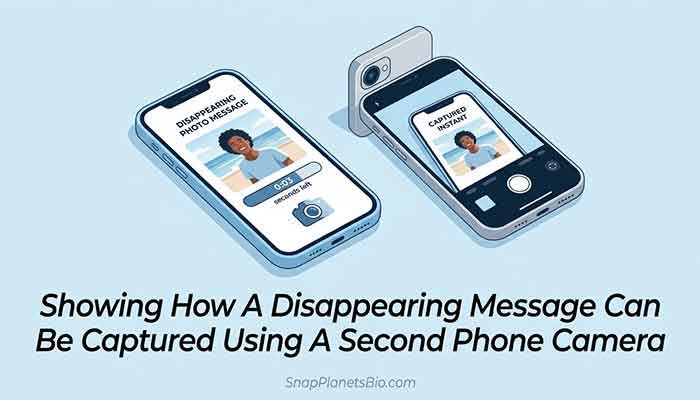
Okay, story time. A few years back, I ran a small experiment with a friend who agreed to help me test Snapchat’s “disappearing” promise. I sent a photo Snap, she opened it, and — like clockwork — it vanished from the chat. Case closed, right?
Not quite. What I learned is that “disappearing” only refers to the app’s interface, not the possibility of someone capturing it before it disappears. My friend used a second phone to photograph her screen while my Snap was open. No screenshot notification, no alert, nothing. The image existed forever the second that second camera clicked.
That moment genuinely changed how I use the app. I stopped assuming “temporary” meant “untraceable.” Honestly, this part confused me at first — I thought Snapchat’s screenshot alerts were bulletproof. They’re not. They only catch screenshots taken through the phone’s native screenshot function, not photos, screen recordings on certain devices, or third-party capture tools.
Since then, I treat every Snap like it could exist somewhere permanently. It’s not paranoia — it’s just how the tech actually behaves.
What Does “Leaked Snapchat” Actually Mean?
When people search for a leaked Snapchat, they’re usually talking about one of a few different situations, and they’re not all the same problem.
- A leaked snap — content you sent that got saved and shared without your permission
- A hacked account — someone gained access to your login and is sending or viewing content as you
- A data breach — Snapchat’s own systems being compromised (this has happened before at a company level, not something an individual user causes)
- Deleted Snapchat content resurfacing — old data appearing after you thought it was gone
Each of these needs a different response, so let’s break them down one at a time.
Read More: Snapchat Price 2026: What Snapchat+ Really Costs
Someone Hacked My Snapchat — Now What?
If you’re typing “someone hacked my Snapchat” into Google at 2 AM, I get the panic. Here’s the order I’d tackle it in.
Step 1: Change Your Password Immediately
Do this first, before anything else. If you can still log in, go straight to settings and change your password. Make it something you haven’t used anywhere else — reused passwords are honestly the number one reason accounts get compromised in the first place.
Step 2: Check “Logged in Devices”
Snapchat lets you see which devices are logged into your account. I check this occasionally even when nothing seems wrong, just as a habit. If you spot a device you don’t recognize, log it out immediately.
Step 3: Turn On Two-Factor Authentication
If you haven’t enabled this yet, stop reading and go do it now. Seriously. Two-factor authentication means even if someone gets your password, they still need a code sent to your phone to get in. It’s the single biggest upgrade to your Snapchat security you can make in under two minutes.
Step 4: Report It to Snapchat Support
Use the in-app reporting tool or Snapchat’s official support site to flag the compromised account. They can help you regain access and investigate suspicious activity tied to it.
How Leaked Snaps Actually Happen (The Uncomfortable Truth)
I want to be straight with you here: in my experience, the vast majority of leaked snap situations aren’t some sophisticated hack. They’re one of these:
- Someone screenshotted or photographed the Snap before it disappeared
- A third-party app claiming to “save Snaps secretly” was used (these are risky and often violate Snapchat’s terms)
- The recipient simply shared a saved chat message or memory
- Weak or reused passwords let someone else into the account entirely
I’m not saying this to scare you — I’m saying it because understanding how it happens is the only way to actually prevent it going forward.
Snapchat Security: The Habits I Actually Use

Here’s my honest, no-fluff routine. I don’t do everything perfectly, but these are the habits that have kept my account solid for years.
| Security Habit | Why It Matters | How Often I Do It |
|---|---|---|
| Unique password | Prevents credential-stuffing attacks | Set once, reviewed yearly |
| Two-factor authentication | Blocks access even with stolen password | Always on |
| Check login devices | Catches unauthorized access early | Monthly |
| Avoid third-party “save Snap” apps | These often harvest data or violate ToS | Never use them |
| Think before sending sensitive content | No app-level fix beats this habit | Every single Snap |
Does Snapchat Update Fix Security Issues?
Every time there’s a Snapchat update, I check the release notes out of habit — it’s a little nerdy, I know. Some updates do genuinely patch security vulnerabilities or improve account protection features. That said, I can’t promise every update addresses leaks or hacking specifically, since Snapchat doesn’t always spell out every technical fix in plain language. My honest take: keep your app updated regardless, because outdated apps are generally easier targets for exploits.
What About Deleted Snapchat Content?
A question I get a lot: “If I delete a Snap or my account, is it really gone?” From what I’ve observed and what Snapchat’s own privacy policy suggests, deleted content is generally removed from active use, though companies typically retain some data for a limited period for legal or operational reasons. I’d treat “deleted” as “no longer visible to others,” not necessarily “erased from every server on earth instantly.” That’s just realistic tech literacy, not a conspiracy theory.
FAQ: Leaked Snapchat Questions People Actually Ask
Thomas’s Final Tip
Here’s my honest bottom line: Snapchat’s disappearing content feature is a nice convenience, not a security guarantee. Treat every Snap like it could be saved somewhere, keep two-factor authentication on, and never reuse passwords. That mindset alone will protect you more than any app feature ever will.
Have you ever had a Snapchat scare like mine? I’d genuinely love to hear how you handled it — drop your story or questions in the comments, and let’s keep each other a little safer out there.